

GSoC Week 5 Experience: Migrating EHR to Laravel - User Module & Roles Module
Roles Module Completion
Search for a command to run...
Roles Module Completion
No comments yet. Be the first to comment.
Connecting Alexa to a Local LLM Running on Raspberry Pi
Introduction Have you ever used: "It works on my machine,". Now, with containerization and cloud computing technologies like Docker and Amazon EC2, those days are gone. Docker, a leading containerization platform, provides a convenient way to package...
Project: Migrate EHR to Laravel - User & Roles Module Introduction I am excited to present my final work submission report for the Google Summer of Code (GSoC) 2023 project: "Migrating LibreHealth EHR to Laravel: Roles and Users Module." Over the pas...
Introduction: Welcome back to the eleventh week of my exciting journey in the Google Summer of Code program. In this blog post, I'm thrilled to share the progress made during this crucial week, including the completion of requested reviews and change...
Introduction: Welcome back to the tenth week of my exhilarating journey in the Google Summer of Code program. In this blog post, I'm excited to share updates on the accomplishments from the past week, including the successful implementation of the Da...
Welcome to the fifth week of my journey in the Google Summer of Code program. This week was a significant milestone for my project as I successfully completed the Roles module. In this blog post, I will share the updates and achievements from the past week, highlighting the completion of the Roles module, as well as my plans for the upcoming week.
With the Roles module nearing completion, this week was dedicated to refining its functionality and ensuring its alignment with project requirements. After carefully reviewing the feedback from my mentor, I implemented the following changes:
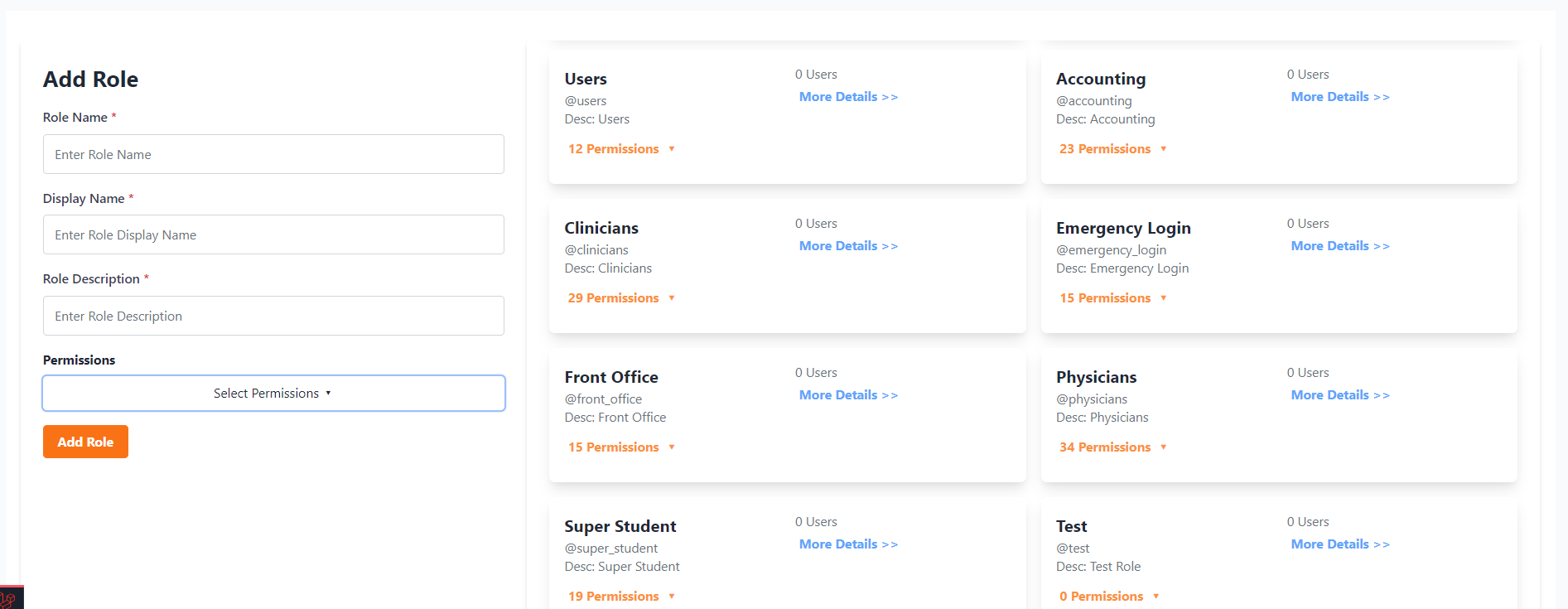
Input Field Uniformity: I made sure that the input fields within the Roles UI were consistent and followed a unified design. This improvement enhances the overall user experience and visual appeal of the module.
Custom Role Add Functionality: As per the mentor's suggestions, I added custom role creation functionality to the module. Users can now create roles that suit their specific needs, providing greater flexibility in managing user permissions.
Users Details for Each Role: To enhance role management, I incorporated a feature that displays detailed information about the users assigned to each role. This addition enables administrators to have a comprehensive overview of user-role relationships within the system.
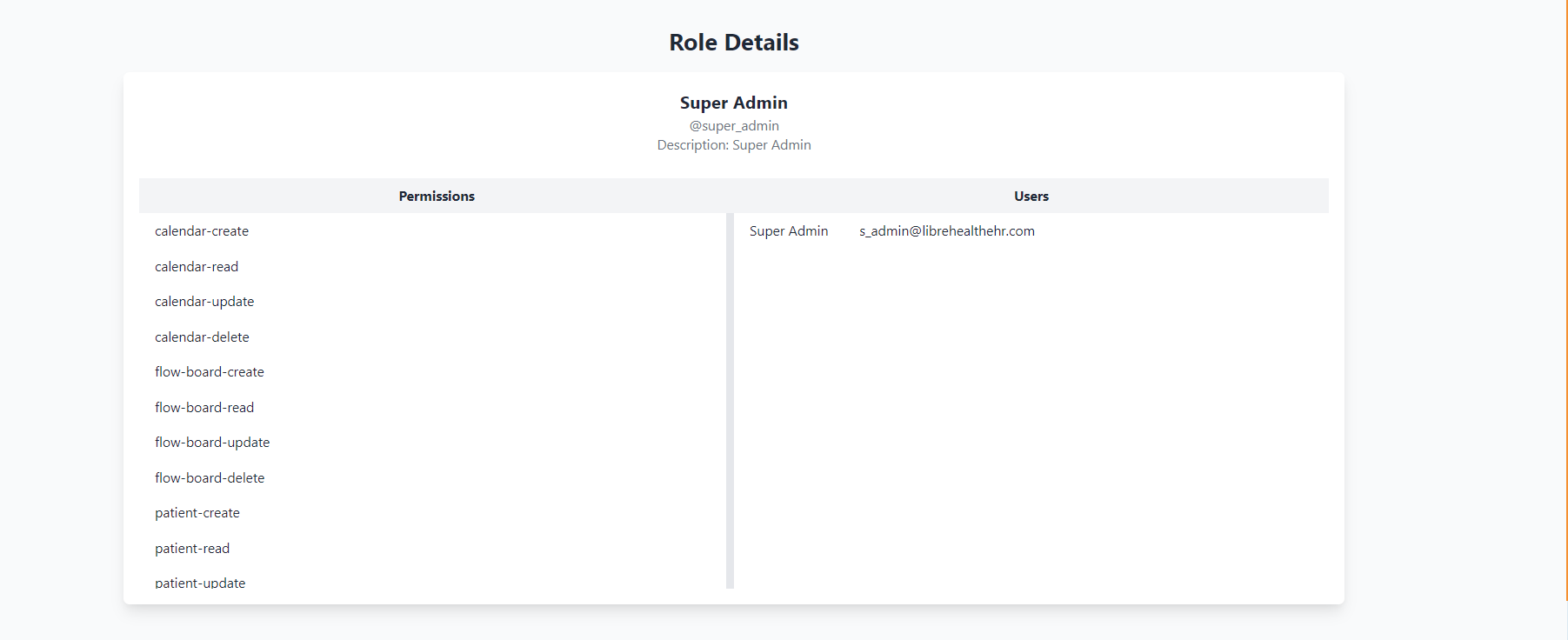
Role Details Page: Another improvement I made based on mentor feedback was the implementation of a Role Details page. This page offers an in-depth view of each role, including its associated permissions, assigned users, and other relevant information. It enhances the transparency and ease of managing roles within the project.
Here is the updated UI:
Role Details Page:
Apart from these, I have also slightly updated the roles seeder which will now incorporate sub-module roles for important sub-modules like users, facilities, payments, etc.
With the Roles module now finalized, I will be shifting my focus to the next phase of the project. In the upcoming week, I plan to start implementing the Users module. This module will enable efficient management of user accounts within the project, further enhancing its functionality and usability.
The fifth week of my Google Summer of Code journey was dedicated to giving the Roles module its final touch. I incorporated the suggested changes, including input field uniformity, custom role add functionality, user details for each role, and a role details page. Collaboration with my mentor was pivotal in refining the module and ensuring its effectiveness. I'm excited to move forward with the Users module in the upcoming week. Stay tuned for more updates in the next blog post. Thank you for following my progress! 💫